



At the core of any digital marketing strategy, a website must meet precise performance standards to rank well on search engines and deliver real results. Google's mission is to surface the most relevant and accessible content so users can quickly find what they're looking for.
In June 2021, Google announced that its ranking algorithm would now factor in Core Web Vitals as ranking signals. In practical terms, this means your site's SEO positioning is directly impacted if it fails to meet these performance benchmarks.
In this article, we share everything you need to generate meaningful search engine results, based on our performance requirements and website functionality standards.
Our golden rule: great content needs a great container.

Performance: Core Web Vitals
Optimizing user experience quality is without a doubt the single most important factor contributing to a website's success.
Google provides tools to measure page performance with the goal of pushing user experience to its highest potential. These tools surface data on the metrics that matter most to web performance: the Core Web Vitals.
The Core Web Vitals are represented by three key user experience factors:
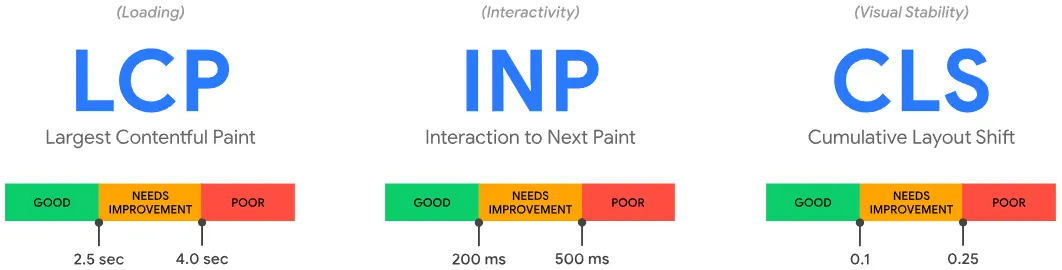
Largest Contentful Paint (LCP)
It measures loading performance by tracking how long it takes for the largest visible element to appear on screen. We recommend keeping it under 2.5 seconds from page load start.
Interaction to Next Paint (INP)
It measures a page's overall responsiveness to user interactions by tracking the delay for every interaction (clicks, taps, keyboard inputs) throughout a user's visit. We recommend a score under 200 milliseconds.
Cumulative Layout Shift (CLS)
It measures a page's visual stability by analyzing unexpected layout shifts that users experience. We recommend a score below 0.1, ideally as close to 0 as possible.
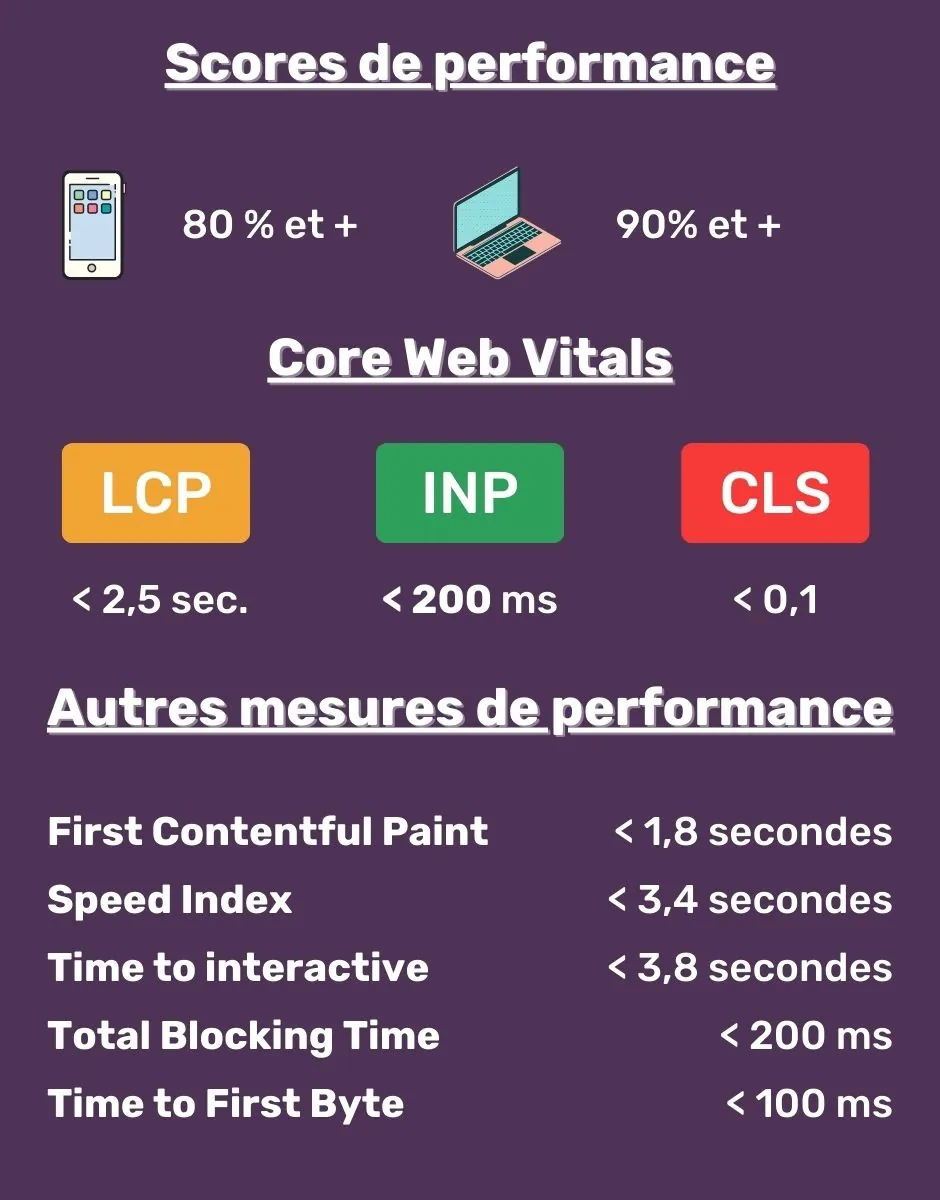
While the Core Web Vitals are the essential metrics to prioritize, we also recommend monitoring additional performance metrics to reach peak performance.
Those metrics are: First Contentful Paint, Speed Index, Time to Interactive, Total Blocking Time and Time to First Byte (TTFB). Our requirements for each are listed in the table below.
Our go-to performance measurement tools
At Ursa Marketing, we rely on a handful of indispensable tools to measure site performance. Here are our two must-haves:

Google PageSpeed Insights
Requirements: 80% on mobile, 90% on desktop (desktop)
Google PageSpeed Insights is a tool for testing a webpage's performance and surfacing actionable technical recommendations for improvement.

Google Tag Manager
Google Tag Manager (GTM) is a tag management system that lets you quickly and easily update performance tracking and measurement tools.
Your CMS must support installing the tags required to implement GTM.
Only one container should be installed on a website. If the web provider's CMS depends on an existing container, admin access must be shared with the client and both parties should coexist within the same container.
The GTM data layer
For conversion tracking, every meaningful visitor interaction on the site should be pushed as an event to the GTM data layer (DataLayer).
Where possible, contextual details should also be passed. For example, when a user views a vehicle listing, the vehicle identifier should be included in the data layer.
Here are some examples of meaningful interactions:
- Product page view
- Form submission
- Appointment request
- Live chat conversation
- Purchases
- Etc.
What features should your CMS include
To save yourself a lot of headaches managing and configuring your site, your CMS should come equipped with the following capabilities:
Images
- Compression and conversion of all images to WebP format.
- This format maintains high image quality while significantly reducing file size, improving page load speed.
- Implementation of Lazy Loading.
- This technique defers image loading until they are actually needed, reducing initial page load time.
- Image markup.
- Relevant information should be automatically populated in the Alt attribute. For a vehicle, for example, the make, model, and year should always be included.
- Alt attributes in <img> tags are used by search engines to understand the content of your images. Properly using Alt tags is an opportunity to improve your search ranking, as they can get your images appearing in image search results.
Redirects
- 301 Redirect
The CMS must allow you to manually add a redirect.
The CMS must support importing a list of redirects in CSV format.
URLs from a legacy site should be redirected to their equivalent URLs on the new site. - 4xx Redirect
A 4xx error means a webpage is inaccessible, usually due to broken links.
These errors prevent users and search engine crawlers from accessing your pages, harming user experience and crawlability, and can lead to a drop in traffic.
Redirects to a relevant page on the site must be implemented. - www Redirect
The www or non-www redirect must point to the primary domain name.
For example, if a user searches for your domain without the www prefix (and your canonical domain uses www), the URL should permanently redirect (301) to the same URL path on the primary domain.
This redirect is critical because search engines treat www and non-www URLs as two separate websites.
File Loading
- Source file bundling
This ensures only the scripts needed for the current page are loaded.
By limiting unnecessary file downloads, page load performance improves. - Source file compression: Minification
Minifying CSS and JavaScript files reduces their size, shortening page load time.
Beyond a better user experience, it also boosts your search engine ranking.
Scripts
Avoid render-blocking: asynchronous loading
- When scripts and CSS are loaded and executed asynchronously, the browser does not have to wait for the download to complete before rendering the page.
Servers
- Initial server response time under 100 milliseconds
Initial server response time (TTFB) is foundational, as all other performance metrics follow from it.
Server-side caching can be considered to reduce response time.
This metric is measured from the moment a page is requested to the moment the server responds. - GZIP server compression
Lossless data compression reduces the size of HTML pages, scripts, and stylesheets.
Benefits of GZIP:
High compression ratio
Fast compression and decompression
Low memory requirements
One of the simplest and most effective optimizations to implement - Cache rules for static files (scripts and images)
We recommend using a very long cache expiration period for static files (1 year) whenever possible.
Browser caching stores static files directly on the user device, reducing the number of requests sent to the remote server by first checking the client-side cache. A long cache lifetime can significantly speed up repeat visits.
Robots.txt
The robots.txt file lives at the root of your website. It is publicly accessible and provides directives to search engine crawlers like Google. Your site organic SEO performance depends heavily on it.
- The site's robots.txt file must be editable through the CMS.
Sitemap.xml
The CMS must be able to automatically generate a sitemap.xml containing all pages you want indexed by search engines. All images and videos managed by the CMS should also be included in an image or video sitemap, as applicable.
- Search engines like Google read this file to crawl your site more efficiently. A sitemap tells Google which files you consider important and provides valuable metadata about them.
Structured markup
Structure your data using Schema.org vocabulary
- Adding structured data to your product, blog, service, and about pages can improve how your organic listings appear in Google's search results.
- Search engines have a limited understanding of what is on your pages. By adding extra markup to your data, you help them better understand your content and display it in a more relevant way.
To make this concrete, consider the example of a braised beef recipe from Ricardo. The structured markup on that recipe page includes specific elements that influence how it appears in search results. Rating, number of votes, and cooking time show up for Ricardo's listing, while the result directly below it lacks any structured markup.

SEO
The CMS must allow editing of meta titles and meta descriptions for all content pages. The option to override auto-generated content must be available on every page.
Titles and descriptions for dynamic pages (such as individual vehicle listing pages) must be auto-generated.
- SEO tags: each meta title and meta description must be unique while accurately representing the page content and incorporating the most relevant keywords.
Duplicate meta titles or descriptions across pages are a missed opportunity to use more targeted keywords. They also make it harder for search engines and users to distinguish between different pages. - SEO tags: character count
The length of your tags impacts your visibility. For the meta title, aim for 40 to 60 characters. For meta descriptions, aim for 130 to 160 characters. Search engines truncate titles and descriptions that exceed these limits. Conversely, falling short of the minimum means a missed opportunity to describe your page and include relevant keywords. - <H1> tags: content must differ from the meta title
If the <title> and <H1> tags on your page match, they can appear over-optimized to search engines. Using the same content in both also means missing a chance to incorporate additional relevant keywords.
Canonical links
The CMS must be able to consolidate duplicate URLs by creating canonical links.
- Webpages are considered duplicates if their content is 85% identical. Duplicate content can significantly harm your SEO performance.
- Google typically shows only one version of duplicate pages, excluding the others from its index and search results - and that page may not be the one you want to rank.
- In some cases, search engines may interpret duplicate pages as an attempt to manipulate rankings. As a result, your site could be demoted or even removed from search results.
The hreflang tag
The hreflang tag configuration must specify both the language code and the country code.
- Every page must include a self-referencing hreflang link to identify its current language. Additionally, all other language versions of the same page must be linked with the appropriate tag.
For example:
- <link rel=alternate hreflang=en href=https://ursa.marketing/en/ />
<link rel=alternate hreflang=fr href=https://ursa.marketing/fr/ /> - This tag is essential from both an SEO and user experience standpoint. It helps search engines determine which page to show each visitor, ensuring they see the correct language version based on their location and language preferences.
User Experience (UX)
As mentioned earlier, user experience plays an extremely important role in website performance. Here are the key points to consider:
Mobile
- Use a responsive layout so that images and content adapt and resize fluidly to the user screen size.
- Ensure search engine crawlers can access your mobile site content and resources for rendering.
Security
HTTPS (Hypertext Transfer Protocol Secure)
- All pages must be encrypted with a valid SSL certificate.
- All images must also be served from a secure server (HTTPS).
- All internal links must use the HTTPS protocol.
HTTPS protects the privacy and integrity of your site data when users visit it. It also provides users with a private and secure browsing experience.
Interstitials (Popups)
Avoid loading interstitials on initial page load
- Loading interstitials on initial page load hurts user experience. On top of increasing load time, users typically find them intrusive.
Note that the recommendations in this article are made with performance in mind. Our standards are grounded in documentation shared by Google and its requirements for achieving a satisfactory performance level and, by extension, an excellent web user experience.
We also recommend running performance tests regularly on your site's most important pages, such as product and service pages. If performance drops, you'll be able to put optimization strategies in place right away.
Always keep in mind that the web is a constantly evolving field. Staying current with best practices for building high-performing websites is essential.
If you have any questions about Ursa Marketing's performance requirements or want to know how we can help you meet them, contact us. We would be happy to guide you through the process.