


Want your product to be the first thing a customer thinks of before making a purchase? Think remarketing.
Remarketing is the practice of showing ads to people who have already visited your website or interacted with your brand across different channels.
When a user is finally ready to take action, chances are your product will be the one that comes to mind, not your competitor's.
Why does remarketing matter?
Remarketing is often the first strategy we recommend in digital marketing. Why? Because the people you're targeting already know your brand, and we all know it's much easier to sell to someone who's familiar with you than to a complete stranger.
According to Big Commerce, average e-commerce conversion rates sit around 1 to 2%. With remarketing, you re-engage everyone who didn't convert and give them a reason to come back.
For example, some visitors may have added a product to their cart without completing the purchase. With remarketing, you can show that exact product to those people again. Another approach is suggesting complementary products to someone who already bought a specific item.
Other visitors simply want to browse before making a decision. Once they've landed on your site, remarketing keeps your brand top of mind. It can also be effective to showcase key projects alongside client testimonials, which helps reduce purchase hesitation. In short, remarketing is an excellent way to build brand awareness and trust.
Remarketing also lets you run campaigns across multiple channels. By identifying where your customers spend time online, you can serve them ads that speak directly to their needs. Your prospects will start to see your brand as an industry leader, simply because you're the one showing up everywhere they look.
Remarketing targets people who are most likely to need your products or services. Platforms like Google and Facebook collect data on every user and can identify purchase intent with impressive accuracy. Honestly, you don't want to know everything they know about you.
How does remarketing work?
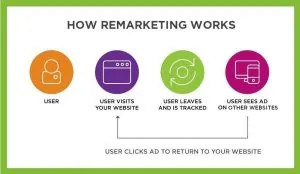
There are several ways to run remarketing campaigns. The most common and widely used is retargeting people who have visited your website. Here is a diagram that briefly illustrates how remarketing works:
Source: https://www.bluecorona.com/blog/how-remarketing-works/
To implement this tactic, all you need is a small snippet of code on your site. That code places a cookie in the browser of each new visitor so you can follow them across the web.
On Google, this snippet is called a tag. On Facebook, it's called a pixel. Installation is relatively straightforward, depending on your technical knowledge and your content management system. When in doubt, ask your developer to handle it.
There are also other ways to retarget, such as:
- Uploading your contact list
- Retargeting people who visited your social media profile
- Retargeting people who engaged with your social media posts
These methods will be covered in more detail later in the article.
Which platforms support remarketing?
Facebook, Instagram, Google and its partners, YouTube (owned by Google), Amazon, LinkedIn, Spotify, Pinterest, Twitter, Snapchat: as you can probably tell, remarketing is available almost everywhere. You can run ads on websites, social networks, and even apps. That's exactly why you need to know which platforms your audience actually uses.
In this article, we focus on Facebook and Google retargeting since they are the most widely used platforms.
Remarketing on Facebook
According to Statista, in 2020 there were over 25 million Facebook users in Canada, representing 64% of the population. In other words, there's a good chance the majority of your prospects are active on this platform.
Keep in mind that Facebook owns Instagram, which is why ad management for both platforms is handled together. Instagram is also a highly profitable channel for reaching a younger audience.
To retarget your audience on Facebook (and Instagram), you first need to install your pixel. You can then target all website visitors as well as your existing Facebook audience. Your options are nearly unlimited, but here are the most popular audiences:
- All website visitors
- Visitors who viewed a specific page
- Excluding visitors who already purchased
- Users who engaged with a post
You can also create custom audiences based on the actions that matter most to your business, though this requires a bit more technical know-how. Another option is dynamic ads, which automatically show people the specific products they already viewed. This strategy is particularly powerful because the user has already shown clear interest in what you're selling. You can also upload a contact list to Facebook and serve personalized messages to those people. This is a great approach since you know exactly where each prospect sits in your sales funnel.
Finally, Facebook remarketing can also be based on in-app activity. Most of you probably don't work for a company with a dedicated app, but if you do, this option is available.
Remarketing on Google
Google currently reaches the largest number of internet users on the planet. Between Google and its partners, your ads can be shown to over 90% of internet users.
Google offers several ways to run remarketing campaigns on its platform.
Google Display
The first method is remarketing on the Display Network, which shows banner ads while you browse the web. For example, when you're reading a blog post, you'll likely notice ads scattered throughout the page. This diagram can help clarify how it works:
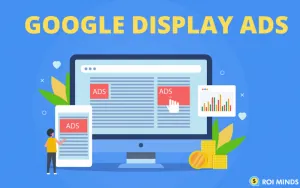
Standard ads let you design visuals and show them to people who have already visited your site. You keep full control over your creatives and messaging. You can also run dynamic remarketing by connecting a product feed created in Google Merchant Center. This more advanced method retargets users who viewed specific products by showing them those same products again.
Note that your remarketing list must include at least 100 active users or visitors from the past 30 days. To create a remarketing audience, you first need to build one in Google Analytics and then import it into Google Ads. Google can also create audiences automatically once it determines the collected data is statistically significant.
Search Network
The second method is remarketing on the Search Network. When you search on Google, you'll often see three paid ads at the top of the page and two at the bottom. The following image illustrates how these ads appear:
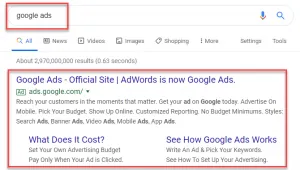
Source: https://trlsolutions.ca/app/uploads/2020/02/google_search_ads.png
You can design campaigns and adjust your bids based on user behavior. For instance, you can tell Google you're willing to pay 25% more for a user who already visited your site before searching. You can also bid on broader keywords when someone has already been to your site, since you know they're already interested.
For the Search Network, your remarketing list must include at least 1,000 active users or visitors from the past 30 days. The list must also be imported from your Google Analytics account.
YouTube
The third method uses YouTube, which is owned by Google. You can run ads on this platform directly from Google Ads. The principle is the same as with Display and Search. You can show ads to people who have interacted with your channel's videos, or upload a contact list.
To run ads on YouTube, you need a Google Ads account and a YouTube channel.
For YouTube, your remarketing list must also include at least 1,000 active users or visitors from the past 30 days.
What's the best strategy?
There's no single right answer, but here are a few core principles we follow at Ursa. The optimal strategy will always vary depending on the type of product or service you offer.
The first question to ask is: where does my audience spend time online? Having a clear picture of who your target audience is is the first step to running successful ads.
Once you know who you're talking to, run tests to determine which platform gives you the best return on investment (ROI) and allocate your budget accordingly.
We recommend being as specific as possible. Rather than targeting one large remarketing audience, break it into smaller groups with similar characteristics and tailor your message to each group. You won't sell to a 25-year-old the same way you'd sell to retirees. The more personalized your messaging, the better your ROI should be. Every campaign needs a clearly defined goal. Do you want to sell a specific product, grow brand awareness, reduce purchase hesitation, upsell to existing customers, or grow your Facebook following? Your strategy should shift based on your objective. In every case, always include a clear call to action in every ad.
But there's more. Did you know your ads can take advantage of the time of day or even weather conditions to improve results? For example, if you're advertising for a restaurant, your prospects are probably most receptive right before a meal. Serving a pizza ad at 5 PM makes a lot more sense than at 8 AM.
We could go on all day sharing strategies, but the most important thing is to put yourself in your target customer's shoes and find the best way to capture their attention.
How far can remarketing go?
The possibilities are nearly endless. Even with current restrictions around minimum audience size and certain targeting characteristics, you can still be very precise.
That said, regulations change almost daily, so staying informed is essential. People are increasingly aware of how much personal data the tech giants collect, and they want to protect their privacy.
Several products, like Apple's iOS 14 update, now include features designed to limit data collection. Google has also announced the elimination of third-party cookies by 2023. It also plans to reduce the lifespan of first-party cookies to 7 days.
This makes first-party data, the data you collect directly from your own customers, increasingly critical if you want to keep delivering remarketing campaigns that reach the right people at the right moment in their journey.